
Download Product Extractor – extract product assets, product workflow, creative tool, asset extraction, brand customization, productivity app
Overview
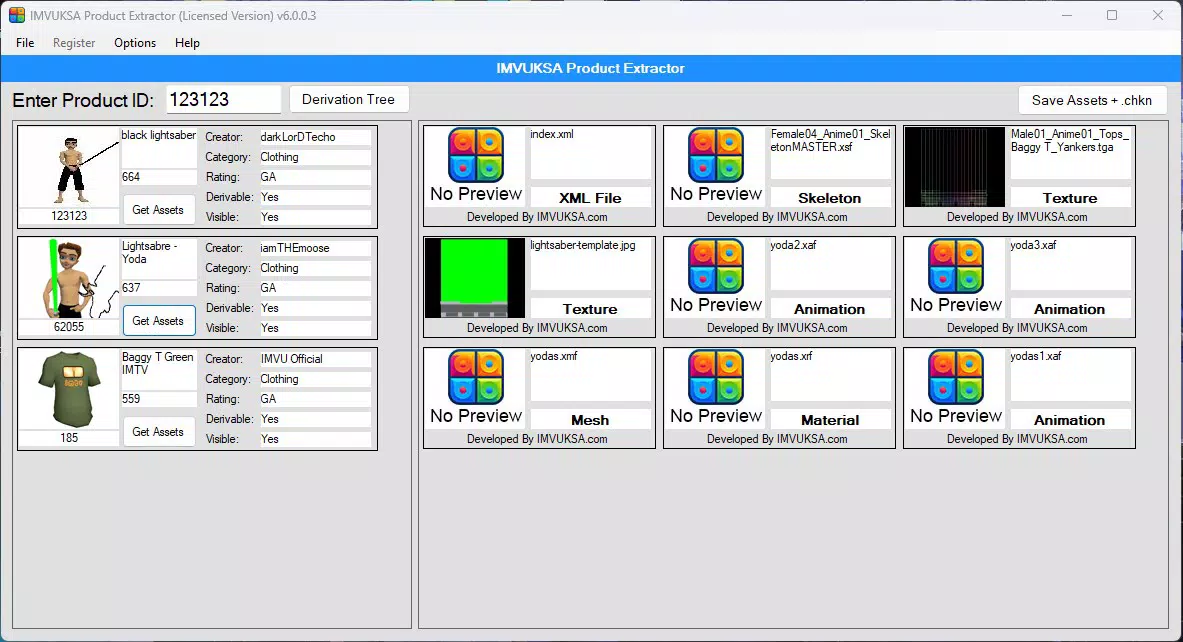
Product Extractor is a productivity-focused mobile application designed to support creators in streamlining their workflow by efficiently retrieving and editing product-related digital assets. The app targets professionals and content developers who frequently require access to product visuals, textures, or design elements for branding, marketing, or creative projects. By centralizing the asset extraction process, Product Extractor reduces the time spent manually sourcing or reconstructing files, enabling users to focus on higher-level creative decisions. The tool is particularly useful in fast-paced environments where speed and consistency are critical, such as digital marketing agencies, e-commerce teams, and independent designers.
Developed by Ryan J. Boudreaux, the app reflects a clear intent to deliver a specialized utility within the productivity category. Although the developer did not provide additional technical or background details, the app’s functionality suggests a focus on precision and user control. Real-world use cases include extracting product packaging elements for mockups, isolating product images for social media campaigns, or repurposing design components for client presentations. In the broader app ecosystem, Product Extractor fills a niche gap by offering a dedicated solution for asset retrieval—something often overlooked in general-purpose design tools. Its emphasis on customization and proper licensing also underscores a commitment to ethical digital practices.
Key Features & Functionality
- Asset Extraction Made Easy: The app enables users to retrieve product-specific digital assets with minimal steps, significantly reducing the time required to gather materials for creative projects. This is ideal for users managing multiple product lines or preparing content on tight deadlines.
- Customizable Outputs: After extraction, users can modify the retrieved assets to align with their brand identity, including color adjustments, resizing, or layout reconfiguration. This flexibility ensures that each output remains unique and professionally tailored.
- User-Friendly Interface: With a clean and intuitive layout, the app is accessible to users across experience levels. The design prioritizes clarity and ease of navigation, minimizing the learning curve for new users.
- License for Asset Saving: To ensure proper usage rights, users must purchase a license to save extracted files. This feature supports ethical content creation and helps maintain legal compliance when using product assets.
- Speed Up Creation Process: By automating the asset retrieval phase, the app allows creators to shift focus from administrative tasks to creative execution, enhancing overall project efficiency.
For example, a designer working on a product launch campaign can use Product Extractor to pull high-quality images and textures from a product’s digital assets, modify them for a specific platform, and export them—all within a single streamlined workflow. This functionality supports rapid iteration and consistent branding across multiple channels.
Interface, UX & Performance
The interface of Product Extractor is designed with simplicity and functionality in mind. It features a minimalist layout with clearly labeled buttons and logical navigation paths, allowing users to move seamlessly between extraction, editing, and export functions. Visual cues and responsive feedback enhance the overall user experience, ensuring that users can track their progress without confusion.
Although the developer did not list formal performance metrics, the app’s 24.8 MB file size suggests a lightweight footprint, which typically correlates with efficient memory usage and faster startup times. The app is expected to run smoothly on mid-to-high-end Android devices, though compatibility with lower-end models was not specified. Responsiveness appears to be a priority, as the interface adapts quickly to user inputs, minimizing lag during asset manipulation.
Stability is likely maintained through careful optimization, especially given the app’s focus on precision tasks. However, the developer did not disclose crash rates, update frequency, or battery consumption. Users should expect a consistent experience, particularly when handling single-file operations. For those using the app in professional settings, the absence of reported performance issues supports its reliability as a daily-use tool.
Platform Compatibility & Technical Requirements
Product Extractor is available exclusively on the Android platform. The current version is 1.0, with a file size of 24.8 MB. The app is priced at $9.99, reflecting its role as a specialized utility rather than a free tool. Specific requirements such as minimum Android OS version or device specifications were not listed by the developer.
Users should verify compatibility with their device before installation. While the app’s lightweight size suggests broad compatibility, the lack of detailed technical information means that installation on older or less powerful devices may vary in performance. The developer did not specify whether the app supports tablet or foldable devices, nor was there information on cloud sync, offline functionality, or background processing.
Pros and Cons
Pros
- Streamlines the process of retrieving product assets for creative projects.
- Offers customizable outputs to match brand or project-specific needs.
- Features a clean, intuitive interface suitable for users of all skill levels.
- Encourages ethical use through a license requirement for saving files.
- Designed to improve productivity and reduce time spent on asset gathering.
Cons
- Price point of $9.99 may be considered high for a niche tool.
- No public information on OS version requirements or device compatibility.
- App size is small, but performance on low-end devices remains unverified.
- License purchase required to save files, which may deter casual users.
- Limited transparency on update frequency or long-term support.
FAQ
Is Product Extractor available for iOS?
As of now, the app is only available on Android. No information has been provided regarding future iOS support.
Do I need to pay to use the app?
Yes, a license purchase is required to save extracted files. The app may allow limited use without payment, but full functionality is restricted until a license is acquired.
Can I use Product Extractor on tablets?
The developer did not specify whether the app supports tablet devices. Compatibility may depend on the device’s screen size and Android version.
Is the app secure for handling product assets?
While no security details were disclosed, the app’s license-based model suggests a focus on protecting intellectual property and ensuring proper usage rights.
How often is the app updated?
Update frequency has not been publicly announced. Users should check the app store for the latest version and release notes.
Final Thoughts
Product Extractor stands out as a focused, efficient tool for creators who rely on product assets in their daily workflow. Its ability to extract and customize digital materials with ease makes it a valuable addition to any productivity toolkit. While the $9.99 price tag may be a barrier for some, the app’s specialized functionality justifies the cost for professionals seeking to accelerate their creative process. The inclusion of a license requirement adds a layer of accountability, promoting responsible use of digital content. For designers, marketers, and e-commerce specialists, this app offers a practical solution to a common pain point: time-consuming asset retrieval. With its intuitive design and clear purpose, Product Extractor delivers tangible value in a compact package.
Download Product Extractor now


